GitHub is a web platform for storing, managing and sharing software projects. It is especially popular among developers and has the following features

1-Version Control
GitHub allows tracking different versions of projects. Users can see changes in the project and revert to previous versions when needed.
2-Cooperation
Multiple developers can work on the same project. Changes can be reviewed and merged through pull requests.
3-Open Source and Special Projects
Users can publish their projects as open source or keep them private. Open source projects encourage contributions from the community
4-Social Features
Users can follow projects, rate them, report issues, and comment. This provides the opportunity to interact with the developer community.
5-Auxiliary Tools
GitHub offers a variety of tools and integrations, including project management and continuous integration (CI/CD).
GitHub is a powerful platform that makes the software development process more efficient and collaborative.
Kaggle is an online platform where users come together for research, competitions, and projects in the field of data science and machine learning. Below are some of the key features that Kaggle offers
1-Competitions
Kaggle organizes various competitions in the field of data science and machine learning. Users develop their own models to solve a particular problem and get the opportunity to test these models in competitions.
2-Data Sets
Users can access various datasets and use them in their projects. Kaggle is an ideal platform to browse, download, and analyze datasets
3-Kaggle Kernels
Users can create “kernels” (notebooks) on Kaggle to share and run their code. This is useful for data analysis, machine learning experiments, and visualizations.
4-Education and Learning
Kaggle offers various courses and educational materials related to data science. Users can improve themselves by practicing and interacting with other users within the community.
5-Community and Communication
Kaggle provides a community where data scientists can share their experiences. Users can ask questions, share knowledge, and interact with other users in forums.
Kaggle is a valuable resource and engagement platform for those looking to pursue a career in data science.
IBM Quantum is a platform developed by IBM on quantum computers and quantum computing technologies. This platform offers various possibilities for researchers, developers and enthusiasts. Here are some of the key features offered by IBM Quantum

1-Quantum Computers
Users can experiment with and develop quantum algorithms by accessing IBM's real quantum computers.
2-Quantum Programming Languages
IBM Quantum provides an open source software development framework for quantum programming called Qiskit, which gives users the ability to create and simulate quantum circuits.
3-Quantum Simulators
Users have access to a variety of simulation tools to simulate quantum circuits, which is useful for increasing theoretical understanding of quantum computing.
4-Research and Education Resources
IBM Quantum offers a variety of educational resources, articles, and tutorials that encourage learning about quantum computing.
5-Community and Collaboration
Users can collaborate with others and join the quantum computing community. This increases knowledge sharing and the development of innovative projects.
IBM Quantum offers a comprehensive resource and platform for those seeking to advance quantum computing research.

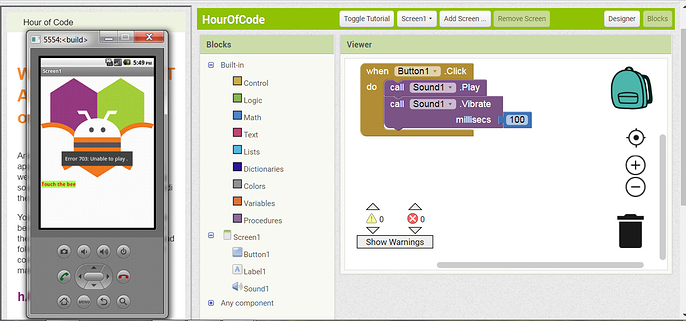
MIT App Inventor is an online platform that allows users to create Android apps. Using a simple drag-and-drop interface, it allows even non-technical people to develop mobile apps. Here are some of the key features that MIT App Inventor offers
1-User Friendly Interface
It is very easy to design applications using drag-and-drop components. This is ideal for users with no programming knowledge
2-Real Time Development
Users can test the application they have developed on an Android device instantly. This allows them to see how the application works immediately.
3-Various Components
MIT App Inventor allows users to add visual components (buttons, labels, text boxes, etc.) and functional components (database connections, internet access, GPS usage).
4-Educational Resources
The platform offers many tutorials and guides for those who want to learn. These resources help users improve their app development skills.
5-Community Support
MIT App Inventor provides a community where users can share their experiences, exchange ideas, and get support.
MIT App Inventor is a platform that makes it easy to develop mobile apps, especially for educational purposes or for beginners.
Google Colab is an online notebook platform that allows users to write and run Python codes. It is very useful for data science, machine learning, and other computational projects. Here are some of the key features offered by Google Colab
1-Cloud Based Working
Users develop their projects in the cloud using Google Colab directly from the browser. This allows working without requiring a local installation.
2-Free GPU and TPU Access
Colab offers free GPU (Graphics Processing Unit) and TPU (Tensor Processing Unit) resources for acceleration of machine learning and deep learning projects.
3-User Friendly Interface
With an interface similar to a Jupyter notebook, Colab allows easy mixing of text, code, and visualizations.
4-Google Drive Integration
Users can easily upload and save their files by integrating their projects directly with Google Drive.
5-Collaboration Features
By collaborating with other users, they can work on the same notebook at the same time, share notes, and get feedback.
6-Rich Library Support
It makes it easy to do data analysis and machine learning using popular Python libraries like NumPy, Pandas, Matplotlib, and TensorFlow.
Google Colab is an excellent tool, especially for those interested in data science and machine learning.
AWS Machine Learning is a set of machine learning services and tools offered by Amazon Web Services (AWS). This platform offers a variety of capabilities to make it easier for developers and data scientists to build, train, and deploy machine learning models. Here are the key features of AWS Machine Learning
1-Various Services
AWS offers many machine learning services, including SageMaker (for developing machine learning models), Rekognition (for image and video analysis), Comprehend (for text analysis), and Lex (for voice and text interaction).
2-Comprehensive Toolkit
AWS provides comprehensive tools with which users can manage data preprocessing, model training, testing, and deployment of machine learning models.
3-Scalability
With AWS cloud infrastructure, machine learning projects can scale as needed. Users can easily increase or decrease the resources they need.
4-Advanced Analytics
It helps improve decision-making processes by providing the ability to analyze, visualize, and derive insights from your data.
5-Easy Integration
It seamlessly integrates with other services in the AWS ecosystem (e.g. S3, Lambda), providing the necessary solutions to store and process your data.
6-Education and Support
AWS provides educational materials, documentation, and support services on machine learning, making it easy to learn and implement.
AWS Machine Learning is a flexible and powerful machine learning platform for both beginners and experienced data scientists.
PythonAnywhere is an online Integrated Development Environment (IDE) and web hosting service designed for the Python programming language. It allows users to write, run, and host Python applications in the cloud without having to manage their own server infrastructure. Here are some basic information and features about PythonAnywhere

1-Browser Based IDE
It provides access using any web browser to write and run Python code. This makes it possible to work from anywhere.
2-Pre-Installed Libraries
Popular Python libraries like Flask, Django, NumPy are pre-installed, which saves installation time.
3-Web Hosting
Users can host web applications using frameworks like Flask or Django and easily manage URLs.
4-Scheduled Tasks
It offers the ability to set up scheduled tasks for scripts to be run at specific intervals, enabling automation of repetitive processes.
5-Database Support
It provides integration with databases such as MySQL and SQLite, which makes it easy to manage data.
6-SSH Access
It offers SSH access for more advanced users who prefer the command line.
7-Free and Paid Plans
It offers a variety of pricing options, including a free tier with limited resources. Paid plans offer more features and capacity.
8-Learning and Experimental Work
Ideal for beginners to learn Python and experiment with coding.
9-Web Application Development
It offers simple solutions for hosting small web applications without a complicated deployment process.
10-Prototype
It helps developers quickly prototype applications without worrying about server maintenance.
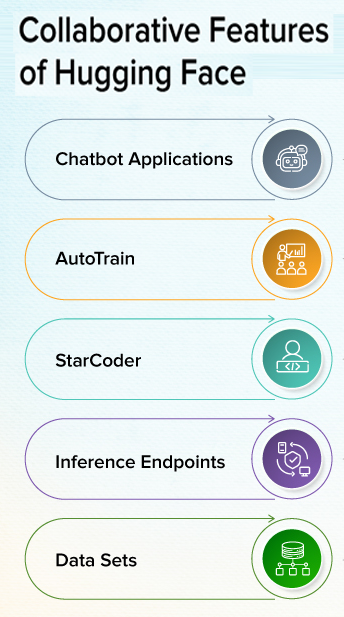
Hugging Face is an AI community that excels at open source software and tools, especially in the field of natural language processing (NLP). Hugging Face enables developers and researchers to create, share, and use language models, machine learning tools, and datasets. Here are some key points about Hugging Face

1-Open Source Models
Hugging Face offers many pre-trained models for natural language processing (NLP). These models can be used for text classification, language modeling, translation, and more.
2-Transformers Library
One of the most popular features of Hugging Face, Transformers is a library that includes various model architectures such as BERT, GPT-2, T5, etc. Users can easily use and customize models through this library.
3-Model Sharing Platform
Users can share the models they develop on Hugging Face, allowing community members to leverage these models in a variety of applications.
4-Dictionary & Interactive Tools
Hugging Face has a user-friendly interface and provides users with opportunities to test language models and develop applications.
5-Hugging Face Hub
On this platform, users can preview, download and integrate models into their own projects.
6-Natural Language Processing (NLP)
It is widely used in fields such as text analysis, summarization, sentiment analysis, and language translation.
7-Visual and Audio Models
Hugging Face also offers resources for models and applications outside of NLP.
Neden Hugging Face?
It facilitates the learning process for users with extensive community support and documentation.
It offers a wide range of models and applications that can work in different languages and domains.
It offers a wide range of models and applications that can work in different languages and domains.